
Learning to make iPhone games for less: free Apple tools and cheap courses
You can learn iOS game development for free with Apple's Xcode, the Swift Playground app and free lessons from Apple and Stanford. Money comes in at two points: an optional paid course, with Udemy showing courses from $14.99 for new learners in October 2026, and the $99 a year Apple Developer Program once you want to publish.
 PickedBox Team·Updated October 18, 2026·Offers checked October 11, 2026
 Udemy codes
The free Apple tools you need to start
Apple gives away the software needed to write iPhone and iPad games. Two pieces matter for a beginner:
- Xcode: Apple's development app for Mac, a free download from the Mac App Store. It is where real iOS projects are built, run in the simulator and sent to a device.
- Swift Playground: Apple's beginner app for learning Swift, free on the App Store for both iPad and Mac. Apple's Swift Playground page says a project started on iPad can be opened on a Mac and moved into Xcode later. Older guides call it Swift Playgrounds.
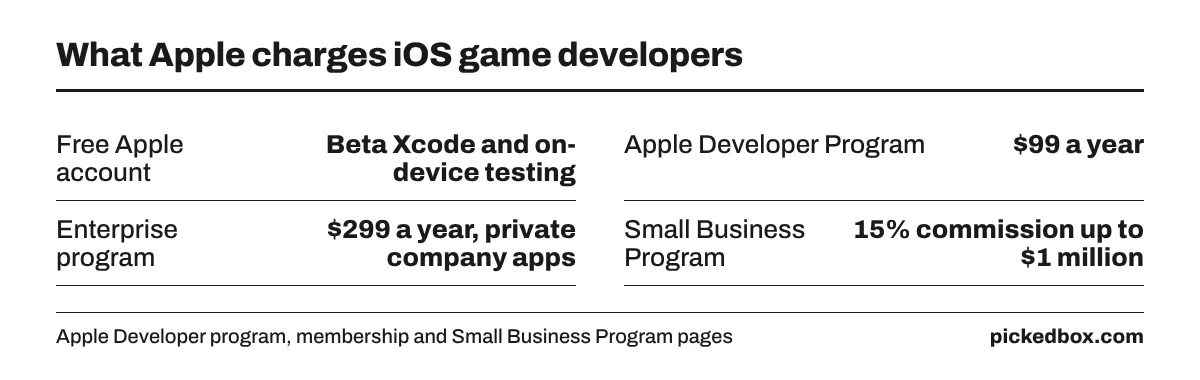
A free Apple developer registration also covers more than many beginners expect. Apple's membership comparison shows that a free account gets beta versions of Xcode, on-device testing using Xcode and access to the developer forums. That means a first game can run on your own iPhone before you pay Apple anything.
The one real hardware cost is a Mac for Xcode. Swift Playground on an iPad is enough to learn the language, but a Mac is needed for full game projects and for App Store submission.
Free lessons from Apple and Stanford
Paid courses are optional. Several solid free options exist:
- Apple Pathways: Apple's Pathways collect documentation, videos and sample code by topic. Apple's games page points beginners to a Games Pathway for game development on Apple platforms.
- Develop in Swift: Apple Education's free curriculum, listed on the Learn to Code page, teaches app building in Xcode one lesson at a time.
- Stanford CS193p: Stanford posts the lecture videos and materials for CS193p, Developing Apps for iOS. The current set is the Spring 2025 course, built on SwiftUI.
For games in particular, Apple's own frameworks include SpriteKit for 2D games and Metal for graphics. A simple 2D game in SpriteKit is a common first project because it needs no outside engine.
The $99 Apple Developer Program fee and when you need it
According to Apple's program page, the Apple Developer Program costs $99 a year. It adds what a free account lacks: App Store Connect, TestFlight for outside beta testers, App Store distribution and code-level support from Apple engineers. The Enterprise program at $299 a year is for private company apps and is not needed for a game.
- Wait to pay: since on-device testing is free, the fee can wait until a game is ready for testers or the App Store.
- Fee waivers: Apple's fee waiver rules cover nonprofits, accredited educational institutions and government entities. Individuals do not qualify.
- Commission: Apple's Small Business Program cuts the commission to 15% on paid apps and in-app purchases for developers with up to $1 million in proceeds in the prior calendar year.
Earlier versions of this page linked to an offer that promised App Store income within weeks with no programming skills. PickedBox removed it. No course can promise sales, and a realistic first goal is a finished small game, not income.
What a Udemy iOS game course costs
Udemy sells courses one at a time and through a subscription plan. On Oct 17, 2026, the Udemy home page showed a new-learner offer with courses from $14.99, as recorded on the PickedBox Udemy store page. Course prices are marked down at different times, so the same course can cost less on one visit than another.
Check three things before buying an iOS game course on Udemy:
- Last updated date: many SpriteKit courses still in Udemy search results were built for Swift 3 and Xcode 8 around 2017. Code from that era often needs fixes in a current Xcode.
- Framework: decide between Apple's SpriteKit and a cross-platform engine before picking a course, since the skills do not carry over fully.
- Refund terms: Udemy's help center says eligible courses can be refunded within 30 days of purchase. Subscriptions are generally excluded, and Udemy can refuse a refund when a large part of the course has been watched.
Udemy's subscription price for US learners could not be confirmed from the official pricing page during the check, and third-party figures disagreed, so no plan price is given here.
How to pay less for a Udemy course
The steps below follow the facts on the PickedBox Udemy store page:
- Look for the new-learner banner on the Udemy home page, which showed courses from $14.99 in October 2026.
- Compare the course page price over a few days before buying, since course prices change often.
- Check the instructor's own site or channel, where instructors sometimes share course-specific offers.
- If you plan to take several courses, compare the subscription plan with buying one course outright.
PickedBox lists three Udemy promo codes and two deals on the Udemy coupon page. A course on a markdown may not accept another code, so compare the final checkout price.
The row below is the same row as on the Udemy page. The code appears after the click; Udemy opens in a new tab.
Skillshare and other low-cost options
Skillshare is a subscription with a catalog that leans toward design, illustration and other creative skills. Its site states that eligible new paid subscribers can get a free trial and that memberships renew automatically until canceled, so cancel before the trial ends if you only want to sample it. The membership price was not shown on the pages loaded during the check. Current offers are on the PickedBox Skillshare store page.
Game art and sound are areas where a creative course can help even if the coding comes from Apple's free material. For the code itself, check that any class uses a recent version of Swift and Xcode.
A low-cost path from first lesson to App Store
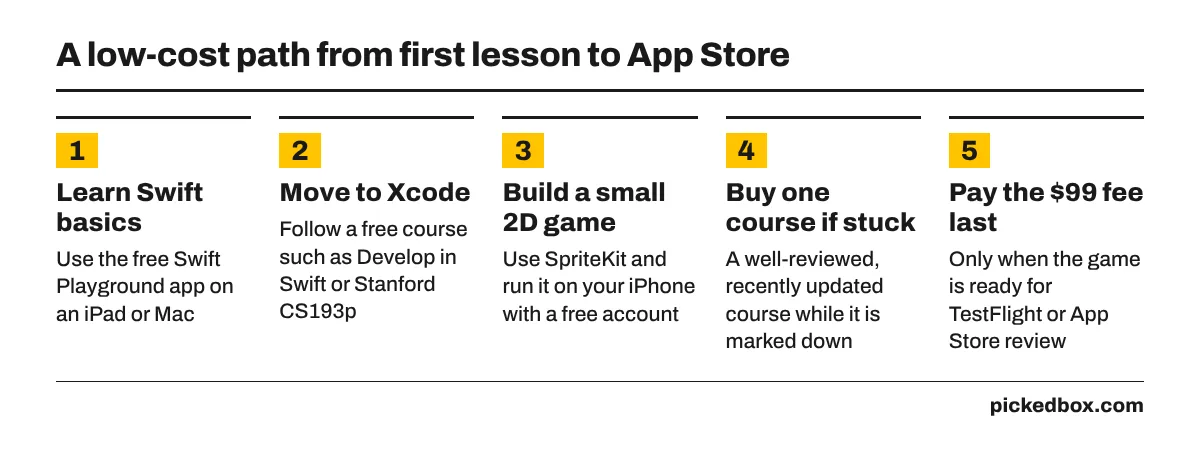
- Learn Swift basics in the free Swift Playground app on an iPad or Mac.
- Move to Xcode and follow a free course such as Develop in Swift or Stanford CS193p.
- Build a small 2D game with SpriteKit and run it on your own iPhone with a free developer account.
- If you get stuck, buy one well-reviewed, recently updated course while it is marked down.
- Pay the $99 Apple Developer Program fee only when the game is ready for TestFlight testers or App Store review.
Following this order, the only fixed cost before launch is a Mac you may already own, plus one optional course.
How we checked this
On Oct 18, 2026, PickedBox checked Apple's Developer Program page for the $99 fee, the membership comparison for what a free account includes, Apple's fee waiver and Small Business Program pages, the Swift Playground page, Apple's games and Pathways pages, Apple Education's Learn to Code page and Stanford's CS193p site. Udemy facts come from the PickedBox Udemy store page (home page checked Oct 17, 2026) and Udemy's help center refund article as summarized in search results, because udemy.com returned an access error. Skillshare's trial terms are from its home page. No course was taken for this page.
- Apple Developer Program
- Apple: compare memberships
- Apple: Developer Program fee waiver
- Apple: App Store Small Business Program
- Apple: Swift Playground
- Apple: games development
- Apple Developer Pathways
- Apple Education: Learn to Code and Develop in Swift
- Stanford CS193p: Developing Apps for iOS
- Udemy help center: refunds
- Skillshare home page
How we test codes and what the labels mean: How we verify coupons.
Related stores
Best offer on our latest check.
 Skillshare
More from the blog
- Oct 14, 2026Making money with social media in 2026: what pays and what it costs
- Oct 18, 2026Logitech Craft keyboard in 2026: price, alternatives and Logitech sales
- Oct 18, 2026KEF LS50 Wireless II: 2026 price, sales and cheaper KEF options
- Oct 18, 2026Zinus platform beds in 2026: prices by size and when Zinus discounts them