
How to buy and sell tickets on StubHub: fees, payouts and timing
Listing tickets on StubHub is free; if they sell, StubHub takes a sell fee that varies by event and shows you the payout before you list. Sellers are typically paid within 8 business days after the event, and buyers pay a service fee and a fulfillment fee on top of the ticket price.
 PickedBox Team·Updated October 1, 2026·Offers checked October 11, 2026
 StubHub deals
How to sell tickets on StubHub, step by step
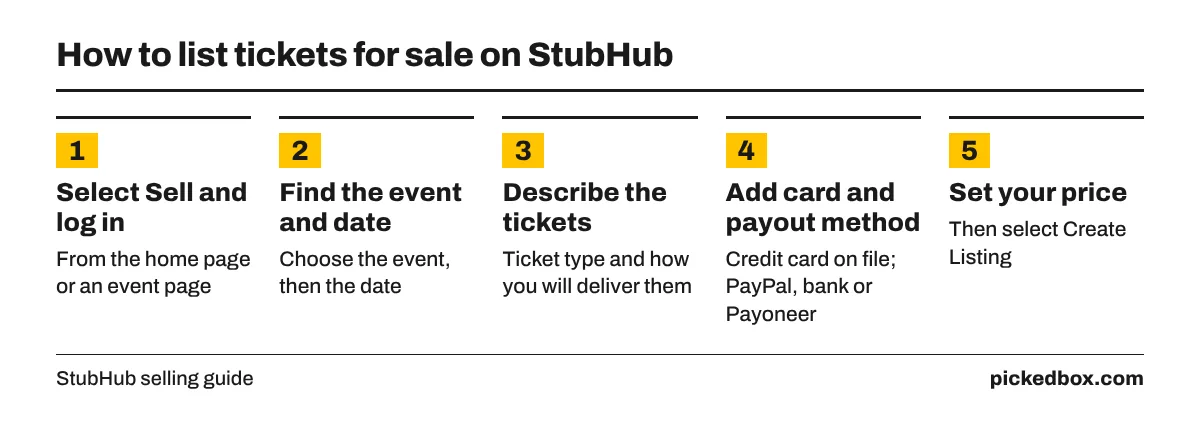
StubHub's selling guide describes a short process:
- Select Sell from the home page or an event page, then log in or create an account.
- Find the event and choose the date.
- Tell StubHub what kind of tickets you have (mobile transfer, e-ticket, barcode or paper) and how you will deliver them.
- Add a valid credit card. StubHub requires one in case it has to buy replacement tickets for your buyer.
- Choose how to get paid: PayPal, bank transfer or a Payoneer prepaid card.
- Set your price and select Create Listing.
If you bought the tickets on StubHub and can no longer go, open the order and select "Can't attend? Sell your ticket." StubHub's resale page says those relistings carry no fees, even if the tickets have not arrived yet.
What StubHub charges sellers
There is no fixed percentage. StubHub's fee page says the sell fee changes with the ticket price, time to the event, event updates and supply and demand. Listing is free, and the fee is charged only if the tickets sell.
You see the fee before you commit. On the Set Your Price page, StubHub shows the payout you will receive; the question mark under the payout opens a breakdown with the sell fee. The same payout figure appears in your listing details and, after a sale, in your sale details.
The fee that hurts is the one for not delivering. If you fail to deliver as promised, StubHub charges the card on file the greater of the full price of the tickets sold or what it costs StubHub to fix the problem for the buyer, including replacement tickets.
How to price tickets you are selling
StubHub lets you set any price per ticket, and its face value article reminds sellers to follow local resale laws. StubHub shows pricing recommendations while you list, but you have the final say.
- Compare total prices. Open the event as a buyer and switch on Include estimated fees under Filters. Buyers see your price plus their fees, so a listing that looks cheap before fees can still lose to a rival.
- Price against similar seats. Look at the same section and row range, not the cheapest seat in the building.
- Adjust over time. You can change the price of a live listing. Prices on popular events often move as the date nears, so check your listing in the last week.
- Listing elsewhere too. StubHub allows it, but delete the StubHub listing the moment the tickets sell on another site, or you risk a double sale and a charge to your card.
When StubHub pays you
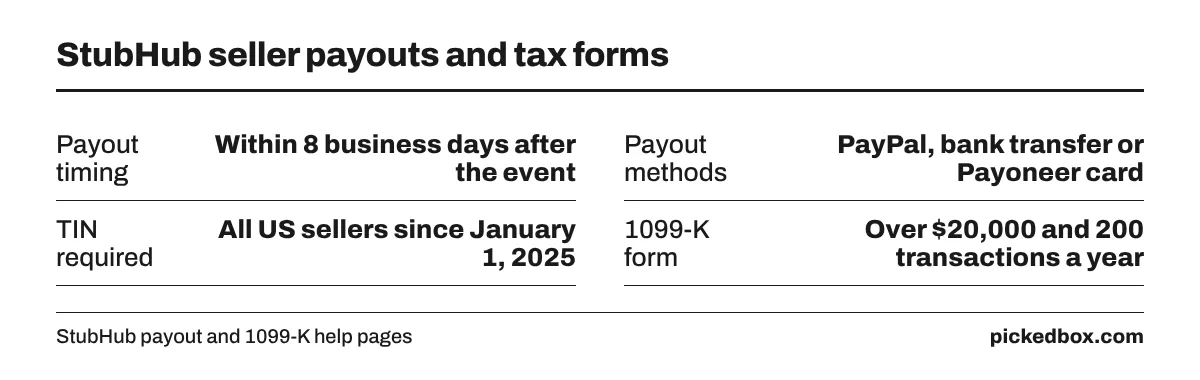
StubHub pays after the event, not after the sale. Its payout article says payouts are typically processed within 8 business days after the event, not counting local bank holidays. A ticket sold in March for a show in August is paid in August.
Common reasons for a late payout, from the same page:
- No default payout method set, or wrong bank or PayPal details.
- A mobile transfer sale that needs proof of transfer, such as a screenshot of the transfer confirmation.
- A missing Taxpayer Identification Number. Since January 1, 2025, all US sellers must add a TIN before StubHub releases payment.
On taxes, StubHub's 1099-K page says sellers with more than $20,000 in sales and more than 200 transactions in a tax year receive a 1099-K form. A tax professional can tell you what to report.
Sellers have complained about payouts that arrive well past the stated window. In December 2025, Digital Music News reported StubHub's finance chief describing interest income earned on money held for sellers. Keep records of every sale until you are paid.
Delivery deadlines for sellers
If you do not have the tickets yet, StubHub lets you list them with an In Hand Date, the latest date by which you must have them. Its help page warns to list only tickets you know you will have, and events happening soon do not offer the deliver-later option.
For mobile transfer tickets, transfer them to the buyer's email from the team or venue app as soon as the sale comes through, and keep the confirmation. That screenshot is also what StubHub may ask for before it pays you.
Buying on StubHub: fees, guarantees and final sales
Buyers pay a service fee and a fulfillment fee at checkout. Like the sell fee, neither is a fixed percentage. To compare real prices, select Filters on the event page and switch on Include estimated fees; the Review and buy page shows the full total before you pay.
- FanProtect Guarantee. Tickets arrive in time for the event, or StubHub provides comparable replacements or your money back.
- Sales are final. You cannot cancel or return an order, but you can resell the tickets on StubHub without fees.
- Canceled events. StubHub's event changes page offers StubHub Wallet credit worth 120% of what you paid, valid for one year, or a cash refund to your original payment method on request. Rescheduled events keep tickets valid with no refund.
- Payment. StubHub accepts major cards, StubHub gift cards, PayPal, Apple Pay and Google Pay, and some buyers see Afterpay.
How to pay less on StubHub tickets
StubHub rarely issues public promo codes. PickedBox tracks StubHub codes on the StubHub coupon page; at the time of checking in October 2026, none of the codes on file had a recent confirmed success. The savings that work come from the marketplace itself:
- Compare listings with estimated fees switched on, so you rank them by what you will actually pay.
- Set a maximum price per ticket with the price slider to hide listings above your budget.
- Apply StubHub Wallet credit or gift cards at checkout under Gift Card.
- If a canceled event leaves you with a choice, take the 120% Wallet credit only if you expect to buy again within a year.
- If plans change, resell on StubHub without fees instead of letting the tickets go unused.
For more on timing and price alerts, see the PickedBox guide to StubHub discount codes.
How we checked this
In October 2026, PickedBox read StubHub's US help pages on selling tickets, fees, payouts, 1099-K rules, pricing, delivery dates, resale of purchased tickets and canceled events, along with the StubHub record on the PickedBox store page and Digital Music News coverage of seller payment delays. The stubhub.com storefront blocks automated requests, so the help pages were read through a text reader. No tickets were bought or sold for this guide.
- StubHub: selling tickets on StubHub
- StubHub: fees to buy and sell tickets
- StubHub: get paid for sold tickets
- StubHub: overview of 1099-K regulations
- StubHub: pricing tickets above face value
- StubHub: listing tickets you don't have yet
- StubHub: need to cancel a purchase
- StubHub: postponed, rescheduled or canceled events
- Digital Music News: StubHub seller payment timing
How we test codes and what the labels mean: How we verify coupons.
Related stores
Best offer on our latest check.
More from the blog
- Oct 14, 2026StubHub discount codes in 2026: what exists and how to pay less
- Oct 1, 2026Is StubHub legit in 2026? FanProtect, fees and what to check before buying
- Oct 15, 2026Dodgers tickets on StubHub: prices, fees and the cheapest time to buy
- Oct 18, 2026Zinus platform beds in 2026: prices by size and when Zinus discounts them